The Problem
Problem Statement
A CDN or WAF is often treated as a single checkbox for web security, but it bundles several distinct capabilities: DDoS protection, caching, and origin IP concealment. Placing one in front of your application does not automatically deliver all three. There are multiple approaches to achieving each one of these capabilities. Each approach fits a different use case, and there is no one-design-fits-all. The important step is to choose the right approach for the use case in hand, and to be clear about which protection you are actually getting.
Why the Traditional Model Fails
Traditional setups come in different forms, but they all share one trait: they require an inbound connection to your service. In a perfect setup, this should not be an issue. In practice, I have seen multiple cases of failure to achieve complete origin IP concealment, usually because of an old unproxied DNS record or a firewall rule that was too permissive. It is safer to assume that security gaps in any architecture might appear.
The underlying problem is that concealment depends on secrecy, Origin IP should get the same treatment as a key or a secret. Once the origin IP leaks nothing stops attackers from bypassing network safeguards.
How Outbound-only Tunnels Work
The Core Idea
Normally, you open an inbound port on your firewall and let the internet connect to your server. A tunnel reverses this: the server calls out to the vendor's edge, and the vendor sends user traffic back down that already-open connection.
The diagram below shows a simplified view of the architecture:
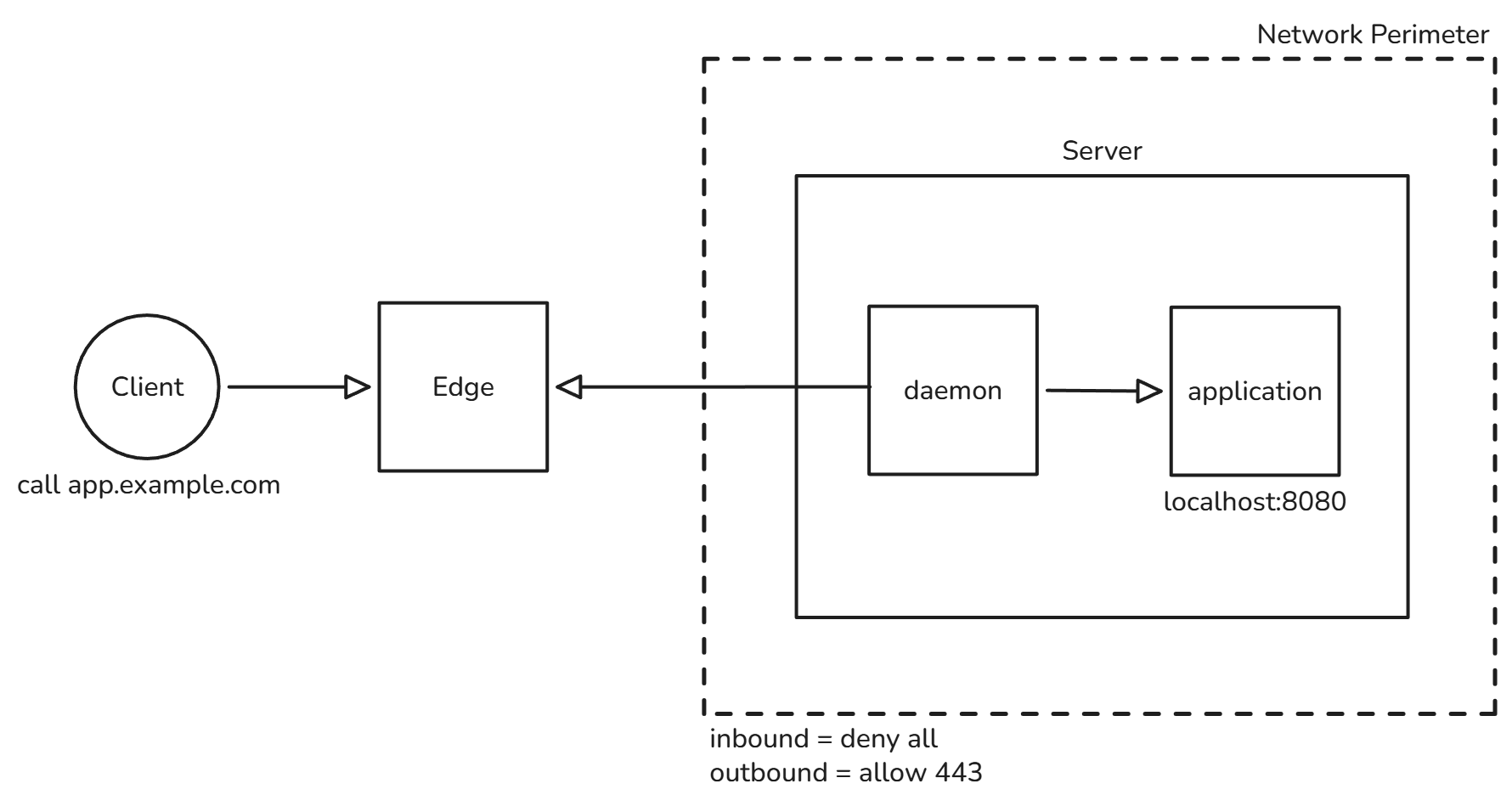
- - The connector is a small daemon running inside your network. It uses a token to open outbound connections to multiple edge servers across more than one data center, for redundancy.
- - Ingress rules map public hostnames to internal services, for example app.example.com points to http://localhost:8080.
- - DNS points the public hostname to the tunnel as a proxied CNAME, so the server's IP never appears in DNS.
In Practice
Theory only goes so far, so here is how I configured this in my own lab that is running this exact website.
The Tunnel Configuration

The connector runs inside the lab network and opens outbound connections to Cloudflare. Public hostnames are mapped to internal services through ingress rules, so nothing is published from the server itself.
DNS: No Public IP

The only records are proxied CNAMEs pointing to the tunnel. There is no A record and no origin IP anywhere in DNS, so there is nothing to leak through a DNS lookup or a historical record.
Firewall: All Inbound Blocked

Inbound traffic is denied by default. The only allowed traffic is outbound, so the connector can reach Cloudflare. The server accepts nothing it didn't ask for.
Why is this Approach Effective?
- 1. Nothing to find. With no open ports and no public origin IP.
- 2. It closes the WAF bypass. The classic attack of finding the origin and going around the CDN no longer exists, because the origin does not accept direct connections at all.
- 3. Identity-aware, per-app access. Unlike a VPN, which typically places users on the network, a tunnel combined with an identity layer grants access to one application at a time and limits lateral movement.
Final Thoughts
A WAF in front of an open origin is a locked front door with the back door left half-open. Outbound-only tunnels don't make an application invulnerable, but they remove the most common way around your defenses: the direct path to the origin.
Behind the Scenes
Components
Outbound Tunnels consist of 4 main components:
- - Daemon: Small service running in your network , it's only duty is to open an outbound connection.
- - Edge: The vendor's distributed network, it acts as the external gateway for users (security policies are also applied here).
- - Token: Secret allowing the connector act for your server.
- - Routing/Ingress Rules: Mapping between public hostnames and internal services behind the connector.
At Startup
- 1. The daemon authenticates to the vendor's control plane using the token.
- 2. Opens one or more outbound long-lived connections to the edge typically over HTTPs, HTTP/2 or QUIC (some vendors open multiple connections in multiple regions for redundancy).
- 3. Load ingress rules either from edge or local configuration.
- 4. Then just wait for user to initiate a request.
User Connects
- 1. User request reaches edge (DNS points to edge, vendor nameservers are attached to domain).
- 2. Edge applies protection (WAF, DDoS protection, etc.).
- 3. Allowed traffic is sent down the initiated connection at startup (created by the daemon).
- 4. Daemon matches the request against the configured ingress rules and forwards it to the internal service, the response follows.